15 practical ways tradesmen can use AI in 2026
Fifteen practical ways UK tradesmen can use AI to chase payments, write quotes, order materials and fill in certificates faster, and four jobs AI must never do.
By Kian McKiernan, founder of Traddie. Sources linked throughout; see also our editorial policy.
Where AI actually helps a trade business
AI is useful in a trade business in two places. The first is admin: the chasing, invoicing, quoting, ordering and diary juggling that happens after the work. The second is typing: anything you currently copy from one place to another, whether it is a serial number off a label or a list of circuits off a board.
Trades have been slow to start. The ONS reported in July 2026 that 35% of UK businesses with 10 or more staff used AI, against just 13% in construction. Below are fifteen ways to use it, starting with the ones that save the most time, followed by four things you should never hand to AI.
1. Let an AI agent do the office admin
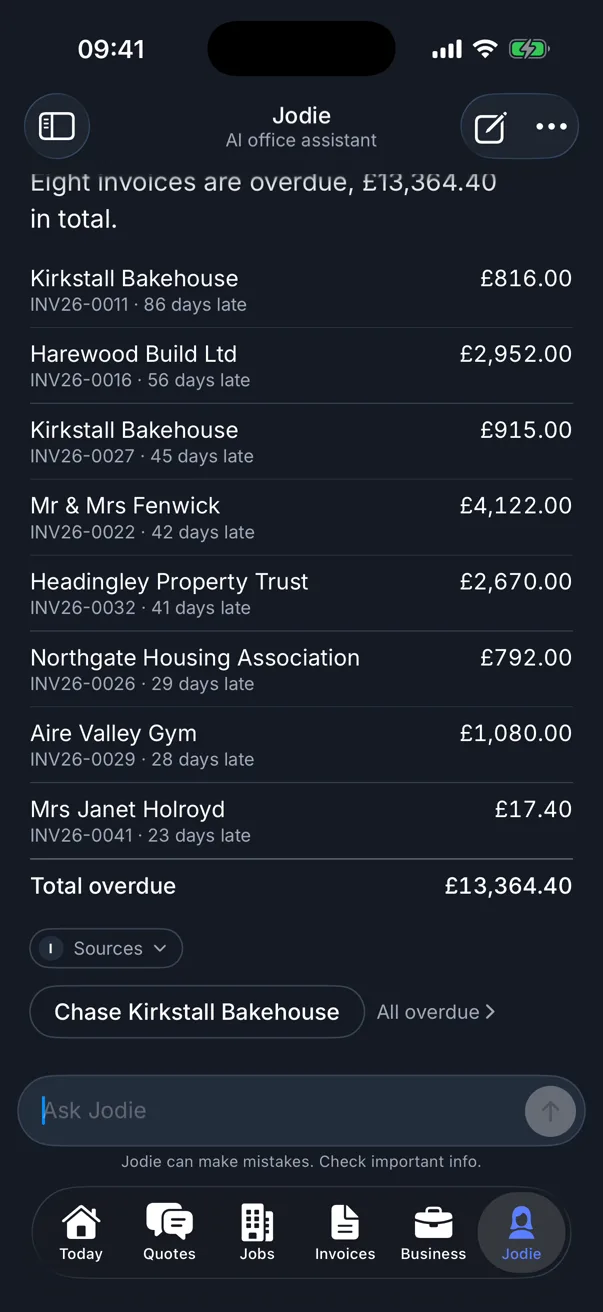
The biggest win is an AI agent that works inside your job software, because it can act on your real jobs and invoices instead of just writing about them. In Traddie, that is Jodie. Message her "invoice my finished jobs" or "who owes me money?" and she does it, showing you what she checked and waiting for your yes before anything is sent.
2. Chase late payers without the awkward phone call
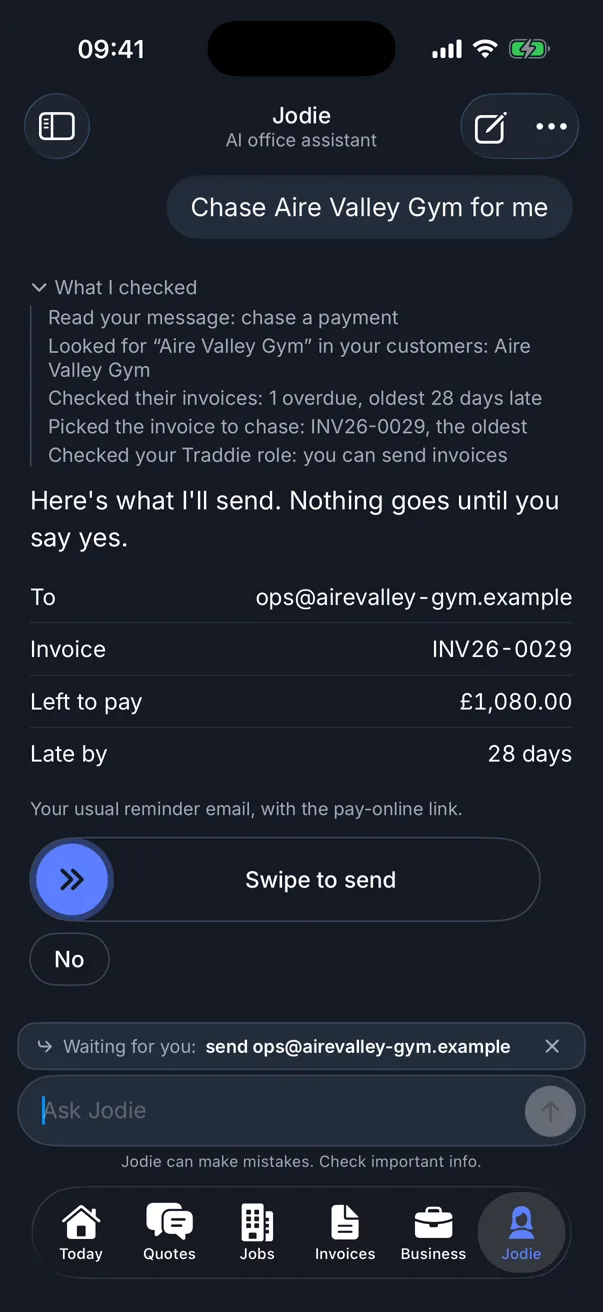
Late payment is the most expensive admin problem a small trade has. Hiscox's Late Payments Report found small businesses are owed £12,357 a year on average in late payments. An AI agent can find every overdue invoice, write a polite reminder with a pay online link and send it when you approve, so chasing becomes a two second job instead of a dreaded one.
3. Order materials with one message
Type what you need the way you would text the merchant, and let the AI build the list. Jodie can fill a Screwfix basket with the right products and quantities for you to check and pay, or raise a purchase order to your own supplier.
4. Turn a voice note into a quote
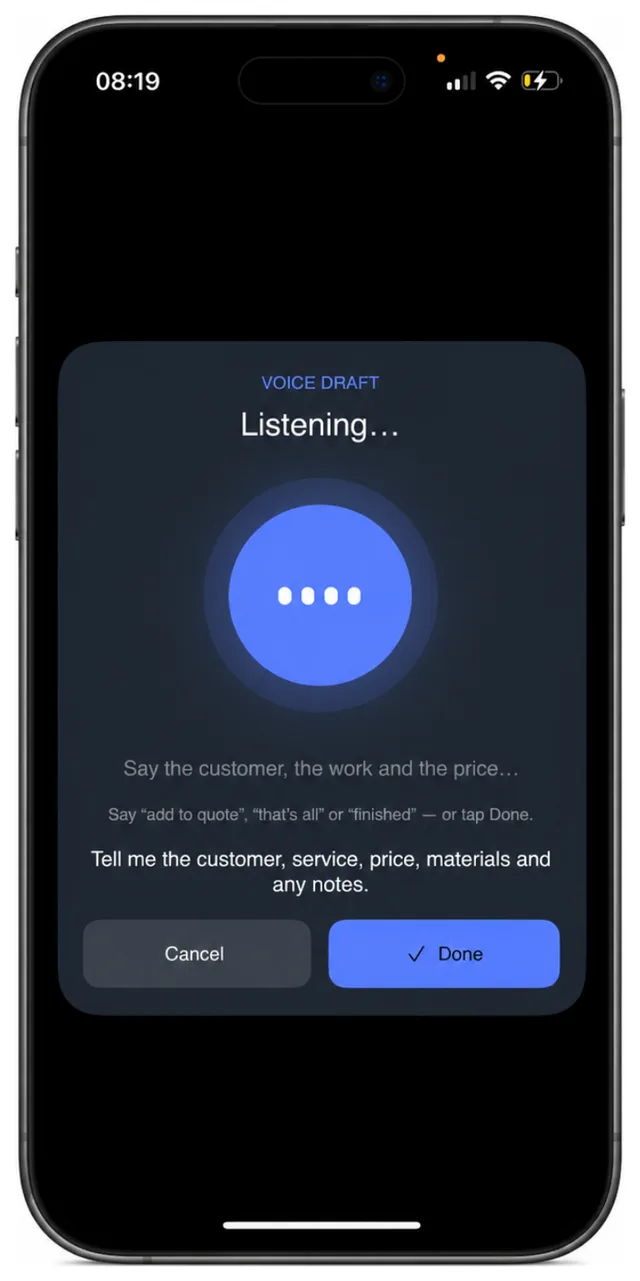
Walk round the job, then describe it out loud while it is fresh. Traddie turns what you said into a draft quote with line items, descriptions and prices to check. It is far quicker than typing on a phone, and far better than trying to remember it all at nine in the evening.
5. Fill in certificates faster
Certificates are mostly typing, and AI can take some of it away. In Traddie you can photograph a consumer unit and it reads the circuits into your EICR, or photograph a boiler data plate and it fills in the appliance details. The readings, the inspection and the decisions stay with you. We cover this in detail in the quickest way to do an EICR.
6. Answer the calls you miss
An AI receptionist picks up when you can't, takes the caller's details and what they need, and texts you a summary. If you lose work to missed calls, it can pay for itself with one job a month.
7. Reply to enquiries faster
Use AI to draft replies to enquiries so you can answer between jobs instead of at night. Paste in the customer's message with the personal details taken out, say what you want to tell them, and edit the draft before you send it.
8. Reply to every review
Replying to reviews matters, and Google's own advice is to keep replies personal rather than pasting the same thank you on each one. AI is good at a first draft you then make your own, especially for a calm reply to a bad review. Our guide to Google reviews for tradesmen covers the rest.
9. Write Google Business Profile posts and social captions
Give AI a photo description and a line about the job, and ask for a short post for your Google Business Profile or Facebook. Posting regularly is easier when the writing takes thirty seconds.
10. Make flyers and van graphics
AI design tools such as Canva turn a rough idea into a leaflet, a price list or a van graphic. Use your own photos of your own work.
11. Draft risk assessments and method statements
AI can lay out a RAMS document in a few minutes. Treat it as a first draft only: it doesn't know the site, the access, the people or the hazards you saw. Read it, correct it and sign it yourself.
12. Write terms and conditions in plain English
Ask AI to turn your payment terms, deposit policy and cancellation rules into plain English for your quotes. Check the result against what you actually want, and get advice on anything legal you are unsure about.
13. Understand a product manual or datasheet
Paste in a long installation manual and ask for the clearances, the commissioning steps or the warranty conditions. It is a quick way to find the bit you need, as long as you check the answer against the manual itself before you rely on it.
14. Log expenses from receipts
Photograph a receipt and let the app read it into an expense, so the details and the VAT are recorded on the day rather than in a shoebox at the end of the quarter. Traddie does this, and exports it to your accounts software.
15. Talk to customers in their own language
Translation apps let you explain a job, a price or a safety warning to a customer who isn't confident in English. For anything that matters, such as a gas warning notice, make sure the written paperwork is clear too.
4 jobs AI should never do
AI is a good assistant and a bad decision maker. Keep these four with you.
- Safety decisions and classification codes. Whether something is C1, C2, Immediately Dangerous or At Risk is the competent person's judgement.
- Signing a certificate. Your signature says you did the work and checked it.
- Setting prices you haven't checked. AI doesn't know what you agreed or what materials cost today.
- Holding customer data in tools you haven't checked. Personal data is covered by UK GDPR, and the ICO's AI guidance is the place to start.
How to start using AI this week
Pick the one job that costs you the most evenings and start there. For most trades that is chasing money and invoicing, so try an AI agent such as Jodie on your own overdue invoices. If it is calls, try an AI receptionist. If it is writing, use a free chatbot. Give it a fortnight before you add anything else.
If you want to compare tools, our list of the best AI tools for tradesmen goes through the options with prices.
Common questions
What is the best way for a tradesman to use AI?
Use it on the admin that keeps you up at night: chasing payments, invoicing, quoting and ordering. An AI agent inside your job software, such as Jodie in Traddie, can do those jobs with your approval. Use a general chatbot for writing.
Can AI do my paperwork?
A lot of it. AI can draft quotes from your notes, invoice finished jobs, chase late payers, log expenses from receipts and save typing on certificates. You still check and approve it, and anything safety related stays your decision.
Should I use AI to write risk assessments?
Only as a first draft. AI can lay out a risk assessment and method statement quickly, but it does not know the site. Read it, change it to match the job and sign it yourself.
Will AI replace tradesmen?
No. AI can take a lot of the office work off your hands, but it cannot rewire a house, fit a boiler or make a judgement about safety on site. The trades that use it well will simply spend less of their evenings on paperwork.